PS:最近学习用Python怎么写小游戏,研究了几个俄罗斯方块的代码。记录一下:
第一个实现代码如下,这个使用了内置的模块实现的,在PY2.7版本直接运行,在3.x版本需要修改部分语法:
#!/usr/bin/python
# -*- coding: utf-8 -*-

from Tkinter import *;
from random import *;
import thread;
from tkMessageBox import showinfo;
import threading;
from time import sleep;


class BrickGame(object):
    # 是否开始
    start = True;
    # 是否到达底部
    isDown = True;

    # 窗体
    window = None;
    # frame
    frame1 = None;
    frame2 = None;

    # 按钮
    btnStart = None;

    # 绘图类
    canvas = None;
    canvas1 = None;

    # 标题
    title = "BrickGame";
    # 宽和高
    width = 450;
    height = 670;

    # 行和列
    rows = 20;
    cols = 10;

    # 下降方块的线程
    downThread = None;

    # 几种方块
    brick = [

        [
            [
                [1, 1, 1],
                [0, 0, 1],
                [0, 0, 0]
            ],
            [
                [0, 0, 1],
                [0, 0, 1],
                [0, 1, 1]
            ],
            [
                [0, 0, 0],
                [1, 0, 0],
                [1, 1, 1]
            ],
            [
                [1, 1, 0],
                [1, 0, 0],
                [1, 0, 0]
            ]
        ],
        [
            [
                [0, 0, 0],
                [0, 1, 1],
                [0, 1, 1]
            ],
            [
                [0, 0, 0],
                [0, 1, 1],
                [0, 1, 1]
            ],
            [
                [0, 0, 0],
                [0, 1, 1],
                [0, 1, 1]
            ],
            [
                [0, 0, 0],
                [0, 1, 1],
                [0, 1, 1]
            ]
        ],
        [
            [
                [1, 1, 1],
                [0, 1, 0],
                [0, 1, 0]
            ],
            [
                [0, 0, 1],
                [1, 1, 1],
                [0, 0, 1]
            ],
            [
                [0, 1, 0],
                [0, 1, 0],
                [1, 1, 1]
            ],
            [
                [1, 0, 0],
                [1, 1, 1],
                [1, 0, 0]
            ]
        ],
        [
            [
                [0, 1, 0],
                [0, 1, 0],
                [0, 1, 0]
            ],
            [
                [0, 0, 0],
                [1, 1, 1],
                [0, 0, 0]
            ],
            [
                [0, 1, 0],
                [0, 1, 0],
                [0, 1, 0]
            ],
            [
                [0, 0, 0],
                [1, 1, 1],
                [0, 0, 0]
            ]
        ]
    ];

    # 当前的方块
    curBrick = None;
    # 当前方块数组
    arr = None;
    arr1 = None;
    # 当前方块形状
    shape = -1;
    # 当前方块的行和列(最左上角)
    curRow = -10;
    curCol = -10;

    # 背景
    back = list();
    # 格子
    gridBack = list();
    preBack = list();

    # 初始化
    def init(self):

        for i in range(0, self.rows):
            self.back.insert(i, list());
            self.gridBack.insert(i, list());

        for i in range(0, self.rows):

            for j in range(0, self.cols):
                self.back[i].insert(j, 0);
                self.gridBack[i].insert(j, self.canvas.create_rectangle(30 * j, 30 * i, 30 * (j + 1), 30 * (i + 1),
                                                                        fill="black"));

        for i in range(0, 3):
            self.preBack.insert(i, list());

        for i in range(0, 3):

            for j in range(0, 3):
                self.preBack[i].insert(j, self.canvas1.create_rectangle(30 * j, 30 * i, 30 * (j + 1), 30 * (i + 1),
                                                                        fill="black"));

                # 绘制游戏的格子

    def drawRect(self):

        for i in range(0, self.rows):

            for j in range(0, self.cols):

                if self.back[i][j] == 1:

                    self.canvas.itemconfig(self.gridBack[i][j], fill="blue", outline="white");

                elif self.back[i][j] == 0:

                    self.canvas.itemconfig(self.gridBack[i][j], fill="black", outline="white");

                    # 绘制预览方块
        for i in range(0, len(self.arr1)):

            for j in range(0, len(self.arr1[i])):

                if self.arr1[i][j] == 0:

                    self.canvas1.itemconfig(self.preBack[i][j], fill="black", outline="white");

                elif self.arr1[i][j] == 1:

                    self.canvas1.itemconfig(self.preBack[i][j], fill="orange", outline="white");


                    # 绘制当前正在运动的方块
        if self.curRow != -10 and self.curCol != -10:

            for i in range(0, len(self.arr)):

                for j in range(0, len(self.arr[i])):

                    if self.arr[i][j] == 1:
                        self.canvas.itemconfig(self.gridBack[self.curRow + i][self.curCol + j], fill="blue",
                                               outline="white");

                        # 判断方块是否已经运动到达底部
        if self.isDown:

            for i in range(0, 3):

                for j in range(0, 3):

                    if self.arr[i][j] != 0:
                        self.back[self.curRow + i][self.curCol + j] = self.arr[i][j];

                        # 判断整行消除
            self.removeRow();

            # 判断是否死了
            self.isDead();

            # 获得下一个方块
            self.getCurBrick();

            # 判断是否有整行需要消除

    def removeRow(self):

        for i in range(0, self.rows):

            tag1 = True;
            for j in range(0, self.cols):

                if self.back[i][j] == 0:
                    tag1 = False;
                    break;

            if tag1 == True:

                # 从上向下挪动
                for m in xrange(i - 1, 0, -1):

                    for n in range(0, self.cols):
                        self.back[m + 1][n] = self.back[m][n];

                        # 获得当前的方块

    def getCurBrick(self):

        self.curBrick = randint(0, len(self.brick) - 1);
        self.shape = 0;
        # 当前方块数组
        self.arr = self.brick[self.curBrick][self.shape];
        self.arr1 = self.arr;

        self.curRow = 0;
        self.curCol = 1;

        # 是否到底部为False
        self.isDown = False;

        # 监听键盘输入

    def onKeyboardEvent(self, event):

        # 未开始,不必监听键盘输入
        if self.start == False:
            return;

            # 记录原来的值
        tempCurCol = self.curCol;
        tempCurRow = self.curRow;
        tempShape = self.shape;
        tempArr = self.arr;
        direction = -1;

        if event.keycode == 37:

            # 左移
            self.curCol -= 1;
            direction = 1;
        elif event.keycode == 38:
            # 变化方块的形状
            self.shape += 1;
            direction = 2;

            if self.shape >= 4:
                self.shape = 0;
            self.arr = self.brick[self.curBrick][self.shape];
        elif event.keycode == 39:

            direction = 3;
            # 右移
            self.curCol += 1;
        elif event.keycode == 40:

            direction = 4;
            # 下移
            self.curRow += 1;

        if self.isEdge(direction) == False:
            self.curCol = tempCurCol;
            self.curRow = tempCurRow;
            self.shape = tempShape;
            self.arr = tempArr;

        self.drawRect();

        return True;

        # 判断当前方块是否到达边界

    def isEdge(self, direction):

        tag = True;

        # 向左,判断边界
        if direction == 1:

            for i in range(0, 3):

                for j in range(0, 3):

                    if self.arr[j][i] != 0 and (
                                self.curCol + i < 0 or self.back[self.curRow + j][self.curCol + i] != 0):
                        tag = False;
                        break;
                        # 向右,判断边界
        elif direction == 3:

            for i in range(0, 3):

                for j in range(0, 3):

                    if self.arr[j][i] != 0 and (
                                self.curCol + i >= self.cols or self.back[self.curRow + j][self.curCol + i] != 0):
                        tag = False;
                        break;
                        # 向下,判断底部
        elif direction == 4:

            for i in range(0, 3):

                for j in range(0, 3):

                    if self.arr[i][j] != 0 and (
                                self.curRow + i >= self.rows or self.back[self.curRow + i][self.curCol + j] != 0):
                        tag = False;
                        self.isDown = True;
                        break;
                        # 进行变形,判断边界
        elif direction == 2:

            if self.curCol < 0:
                self.curCol = 0;

            if self.curCol + 2 >= self.cols:
                self.curCol = self.cols - 3;

            if self.curRow + 2 >= self.rows:
                self.curRow = self.curRow - 3;

        return tag;

        # 方块向下移动

    def brickDown(self):

        while True:

            if self.start == False:
                print("exit thread");
                break;

            tempRow = self.curRow;
            self.curRow += 1;

            if self.isEdge(4) == False:
                self.curRow = tempRow;

            self.drawRect();

            # 每一秒下降一格
            sleep(1);

            # 点击开始

    def clickStart(self):

        self.start = True;

        for i in range(0, self.rows):

            for j in range(0, self.cols):
                self.back[i][j] = 0;
                self.canvas.itemconfig(self.gridBack[i][j], fill="black", outline="white");

        for i in range(0, len(self.arr)):

            for j in range(0, len(self.arr[i])):
                self.canvas1.itemconfig(self.preBack[i][j], fill="black", outline="white");

        self.getCurBrick();
        self.drawRect();

        self.downThread = threading.Thread(target=self.brickDown, args=());
        self.downThread.start();

        # 判断是否死了

    def isDead(self):

        for j in range(0, len(self.back[0])):

            if self.back[0][j] != 0:
                showinfo("提示", "你挂了,再来一盘吧!");
                self.start = False;
                break;

                # 运行

    def __init__(self):

        self.window = Tk();
        self.window.title(self.title);
        self.window.minsize(self.width, self.height);
        self.window.maxsize(self.width, self.height);

        self.frame1 = Frame(self.window, width=300, height=600, bg="black");
        self.frame1.place(x=20, y=30);

        self.frame2 = Frame(self.window, width=90, height=90, bg="black");
        self.frame2.place(x=340, y=60);

        self.canvas = Canvas(self.frame1, width=300, height=600, bg="black");
        self.canvas1 = Canvas(self.frame2, width=90, height=90, bg="black");

        self.btnStart = Button(self.window, text="开始", command=self.clickStart);
        self.btnStart.place(x=340, y=400, width=80, height=25);

        self.init();

        # 获得当前的方块
        self.getCurBrick();

        # 按照数组,绘制格子
        self.drawRect();

        self.canvas.pack();
        self.canvas1.pack();

        # 监听键盘事件
        self.window.bind("<KeyPress>", self.onKeyboardEvent);

        # 启动方块下落线程
        self.downThread = threading.Thread(target=self.brickDown, args=());
        self.downThread.start();

        self.window.mainloop();

        self.start = False;

    pass;


if __name__ == '__main__':
    brickGame = BrickGame();
运行截图如下:
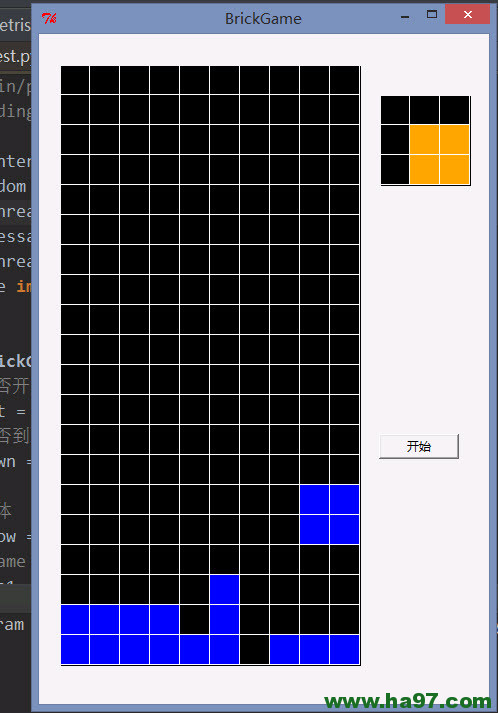
注意:这个程序依赖图形界面,要在图形界面上才能正常运行,win和Linux的图形界面都可以。在纯终端命令界面是不能正常运行的。